Resolve calls and texts in triage
File the calls and texts LawMOR could not match on its own, create leads, or dismiss them with a reason.
Open Triage
Select Triage in the left menu. The list holds calls and texts LawMOR could not file on its own. Use the filters All, Unknown number and Pick a matter to narrow it. The top shows how much was filed without help this week.
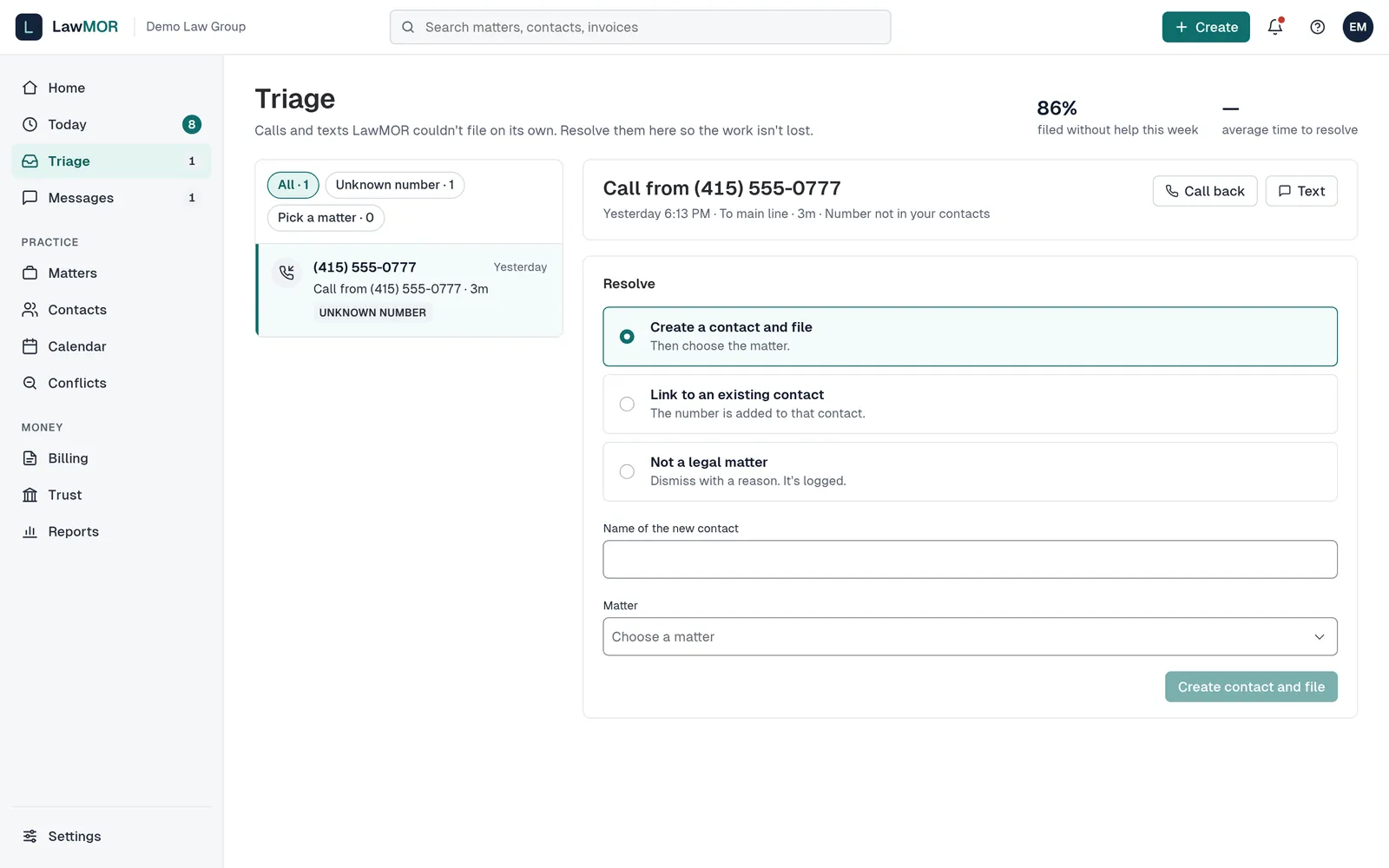
Triage with a Pick a matter item open. Pick a matter
For an item tagged Pick a matter, read the quote, choose the matter under Which matter is this about? and select File to with its number. Any draft time moves with it and stays private to its timekeeper.
File a call from an unknown number
Choose Create a contact and file, Link to an existing contact, or Not a legal matter. Enter the name or pick the contact, choose the matter, and select Create contact and file or Add number and file. When the caller mentions an existing client, LawMOR suggests a related contact.
Handle a new lead from the AI receptionist
If your firm uses the AI receptionist, its calls show the intake details and a conflict pre-check. Choose Create a lead, Link to an existing contact, or Not a legal matter, then select the button below. A receptionist call never becomes billable time.
Dismiss what is not legal work
Select Not billable or Not a legal matter, type the reason, and confirm. The reason is logged with who did it and when.
Did this not answer your question? Contact support and we will reply within one business day.