Record trust deposits, disbursements and transfers
Set up the trust account, then post deposits, payments out, moves between clients and invoice payments.
Set up the trust account
The first time you open Trust, the firm owner fills in Bank, Account number (stored encrypted), Opened and Designated licensee, then selects Create trust account. The licensee must be an attorney with a bar number on file; add it in Settings, Team, Edit details.
Record a deposit
Select Record deposit. Choose the Client, enter the Amount, Date, Received from, Check / reference no., Method and Purpose, and select Post.
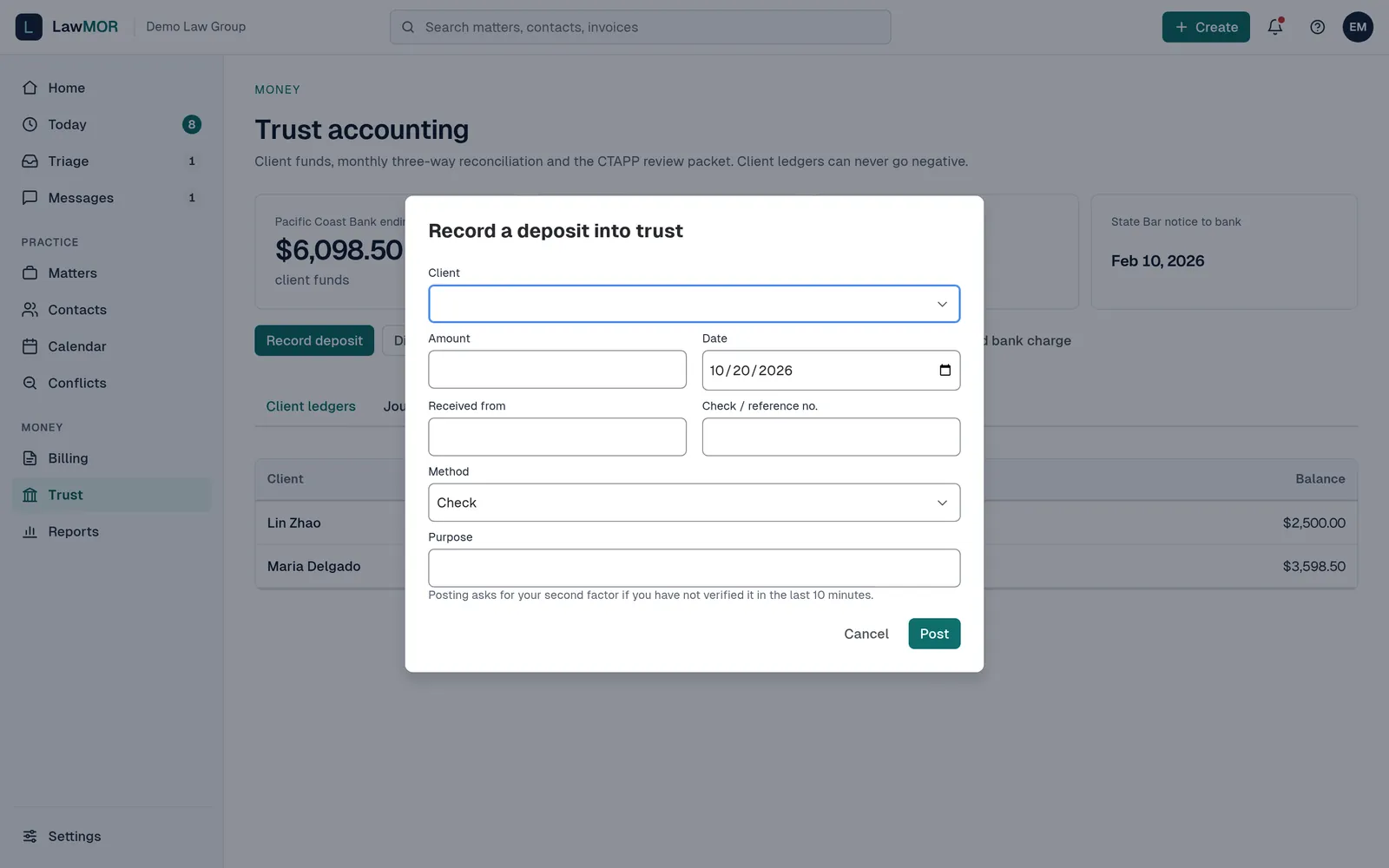
Record a deposit into trust. Pay money out or move it
Select Disburse to pay out from a client's funds, Move between clients to transfer between two client ledgers, or Pay invoice from trust to apply funds to an issued invoice. A client ledger can never go below zero.
Confirm your second factor
Posting asks for your second factor if you have not confirmed it in the last 10 minutes. After you confirm, the posting goes through.
Send receipt notices
Open the Receipt notices tab to see deposits that still need a notice to the client, and select Email notice on each.
Correct a mistake
Trust records are never edited. Open the client's ledger from Client ledgers, select Reverse on the transaction, give a reason and select Post reversal. A mirror-image entry is posted and both stay in the journal.
Did this not answer your question? Contact support and we will reply within one business day.