File emails that need a matter
When a contact has several open matters, LawMOR asks you which one an email belongs to.
Know how LawMOR decides
An email goes to a matter automatically when: it continues a conversation already on a matter; the contact is the client on exactly one open matter; the contact is a party on exactly one open matter; or the email names the matter number. Otherwise, if AI is switched on for your firm and is confident, it picks the matter. Everything else waits for you.
Open the list
Go to Settings, Email accounts and scroll to Emails that need a matter. Only you see the emails from your own mailbox here.
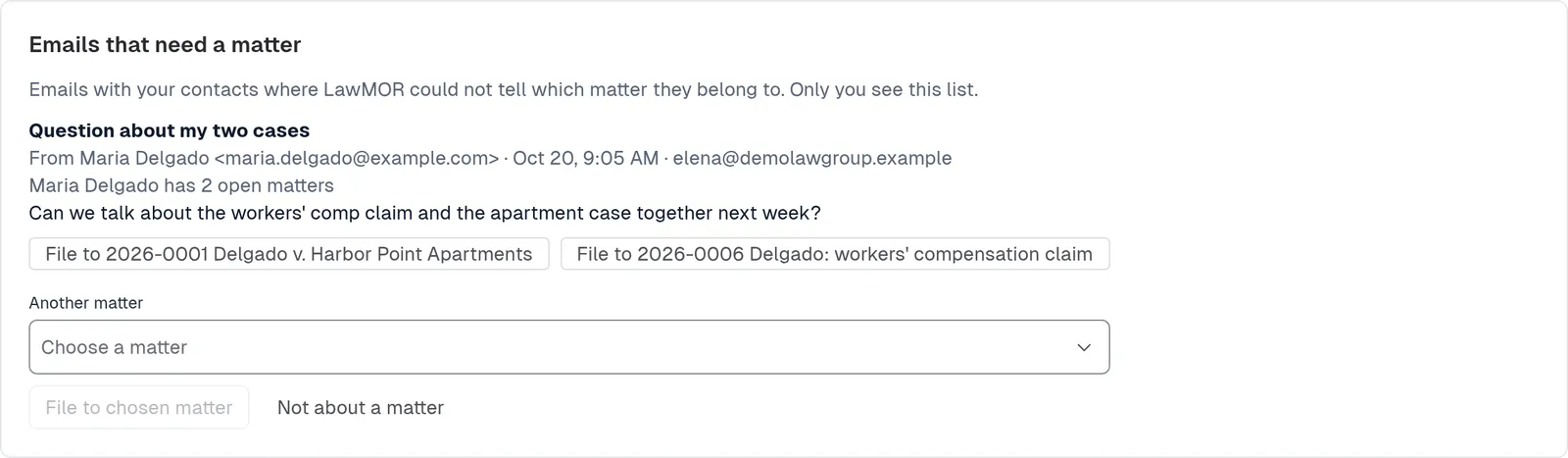
Choose the matter with one click. File it or set it aside
Select File to and the suggested matter, or choose another matter in the picker and select File to chosen matter. If it is not about any matter, select Not about a matter; it is removed from the list and nothing is stored.
Did this not answer your question? Contact support and we will reply within one business day.